• 13 posts
  • 85 comments
Joined 3 years ago
Cake day: July 8th, 2023
  • You can expand each entry at https://xpipe.io/pricing to see the details. For enterprise operating systems, this includes stuff like RHEL, Windows Enterprise, Amazon Linux, etc. So pricey operating systems that you usually only run in businesses. The pricing page also includes details on cases where this is not the case, e.g. if you’re trying to replicate production systems in your homelab and are running RHEL in there as well for example. If that is the case, I can upgrade your license for free if you send me an email.

    I edited the post and added the link to pricing page to the post to make that more clear.

I’m proud to share major development updates for XPipe, a connection hub that allows you to access your entire server infrastructure from your local desktop. It can make your life easier when working with any kind of servers by eliminating many of the tedious tasks that come up when interacting with remote systems, either from the terminal or from a graphical interface.

It comes with integrations for SSH, docker and other containers, various hypervisors, cloud providers, and more without requiring setup on your remote systems. You can also keep using your favourite text/code editors, terminals, password managers, shells, command-line tools, and more with it.

Hub

It has been half a year since I last posted here, so there are a lot of improvements that were implemented since then:

Netbird support

You can now list and connect to devices in your Netbird network. This works via SSH and your locally installed netbird command-line client:
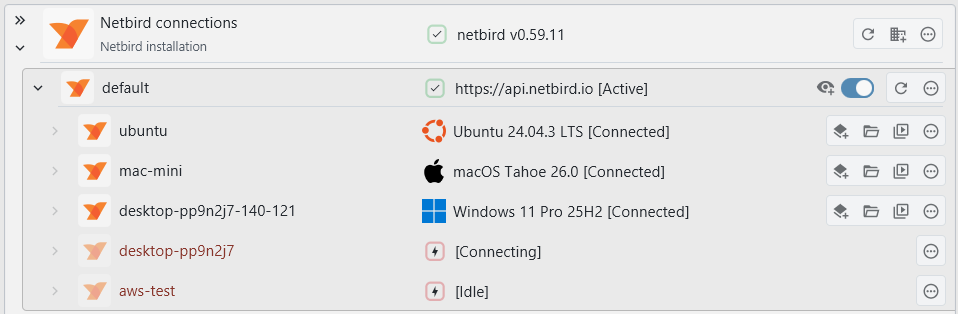
Netbird

Legacy system support

Up until now, the testing was done on relatively up-to-date machines that were not considered EOL. However, in practice, legacy systems are still used. The handling of older Unix-based systems has been greatly improved, especially when they did not ship with GNU command-line tools.

As long as you can connect to a system via SSH somehow, it should work now regardless of how old the system is. If you’re into retrocomputing, feel free to give this a try.


AIX

HP-UX

AWS support

You can now connect to your AWS systems from within XPipe. Currently, EC2 systems and S3 buckets are supported, also including support for SSM. The integration works on top of the AWS CLI. The usage of the AWS CLI allows the integration to work very flexibly on any existing CLI setup if you already use the CLI. You can use any IAM access keys and authentication methods with it.
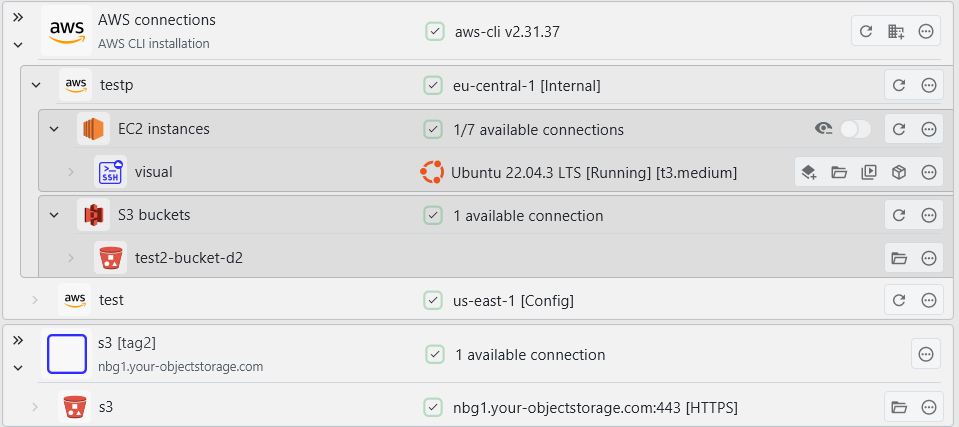
AWS

SSH keygen

You can now generate new SSH keys from within XPipe. The keys are generated via the installed OpenSSH ssh-keygen CLI tool, so you can be assured that the keys are generated in a cryptographically secure manner. This keygen right now supports RSA, ED25519, and ED25519 + FIDO2:
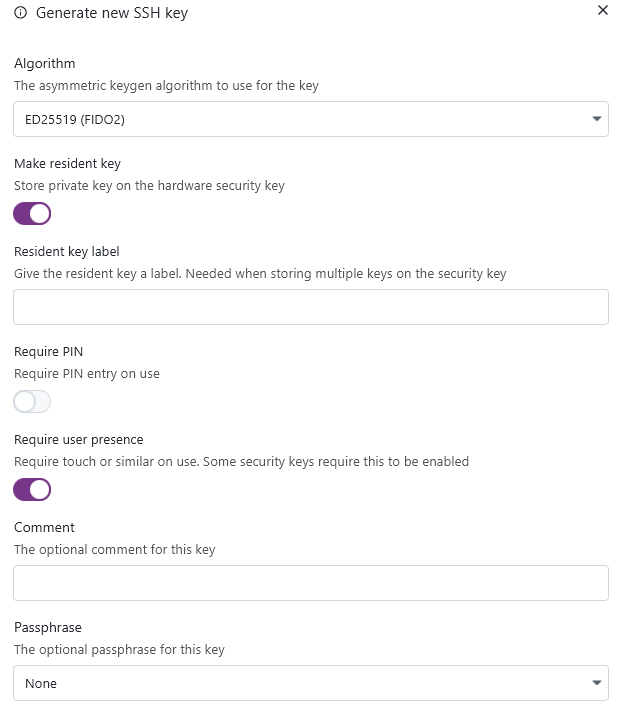
Keygen

Keys of identities can now also be automatically applied to systems, allowing you to perform a quick key rotation when needed:

Identity Apply

The process of changing the authentication configuration of a system is not always one simple step. So the dialog is a comprehensive overview of what is needed to apply a certain identity to a remote system, with various quick-action buttons and notes. This gives you still full manual control of what should be done and an overview of what is required prior to doing so.
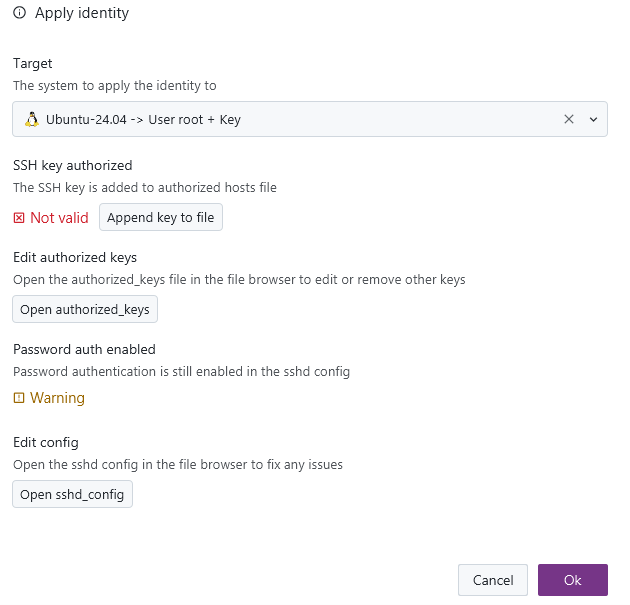
Identity Apply Dialog

Network scan

There is now the option to automatically search the local network for any listening SSH/VNC/RDP servers and add them automatically as new connections. This also works for remote systems and their networks:
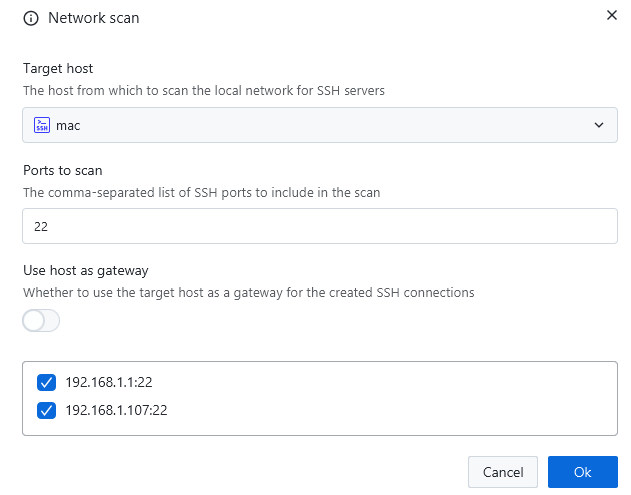
scan

VNC

Up until now, the internal VNC implementation of XPipe did a somewhat acceptable job for most connections. However, it is not able to match dedicated VNC clients when it comes to more advanced features and authentication methods. There’s simply not the development capacity to maintain all of these additional VNC features. For this reason, there is now support to also use an external VNC client with XPipe, just as with any other tool integrations:
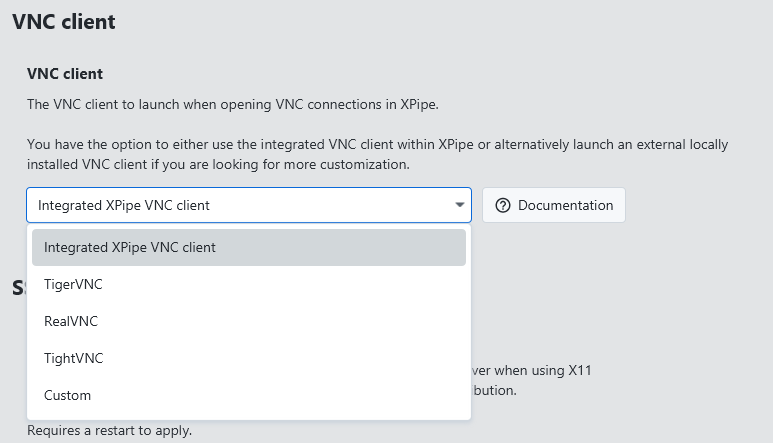
VNC settings screenshot

Split terminals

There is now a new batch action to open multiple systems in a split terminal pane instead of individual tabs. This action is only supported for terminals that support this, which currently includes: Windows Terminal, Kitty, and WezTerm. In addition, this is also supported when using any other terminal and a terminal multiplexer like tmux or zellij.

Split Action

This allows you to also use a feature like broadcast mode of your terminal to type one command into multiple terminal panes at the same time.
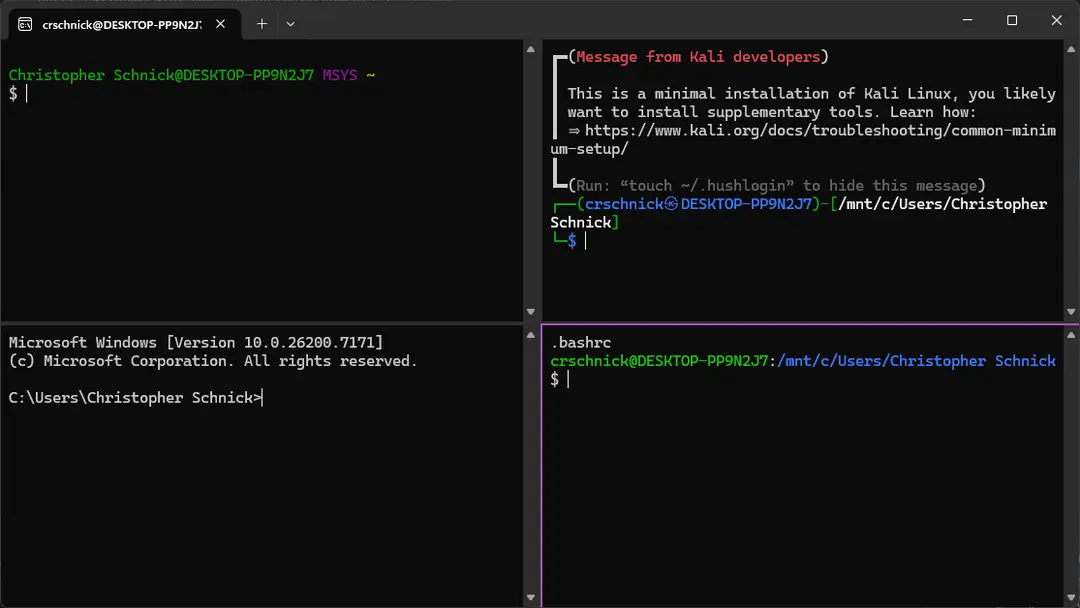
Split Terminal

Tags

You can now create and add tags to connection entries. This allows you to have a more structured workflow when filtering individual connections.
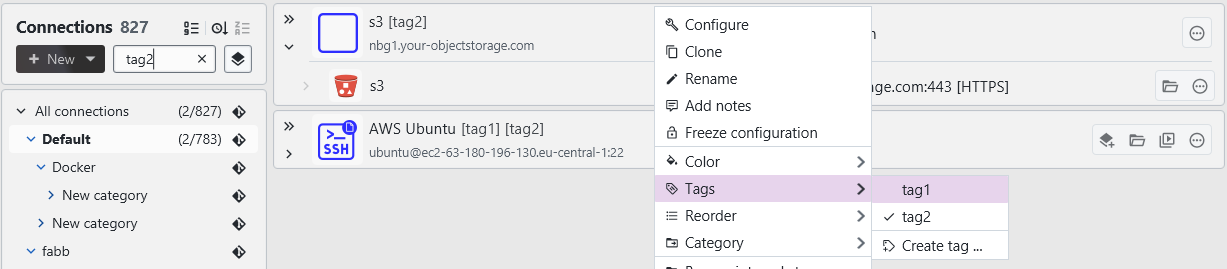
Tags

macOS 26 Tahoe

XPipe adopts many of the new features of macOS 26 right away. The application window now uses the new Liquid Glass theming. The application icon has also been reworked with Liquid Glass in mind. There’s also support for the new apple containers framework:
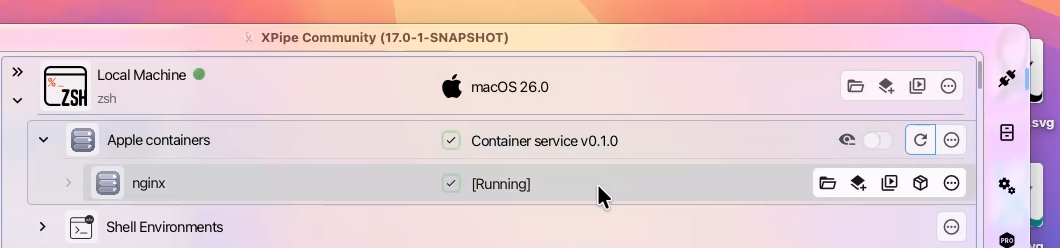
macOS Tahoe screenshot

Windows ARM

There are now native Windows ARM builds. These releases are also available in winget and scoop.

Other

  • Add support for flatpak variants of various editors and terminals
  • The nixpkg package now also supports macOS and has been reworked as a flake
  • Add support for nushell
  • Add support for xonsh
  • Several fixes to be able to run the application in the Android Linux Terminal app without issues
  • The entire interface has been reworked to better work with screen readers and other accessibility tools
  • Various many other small improvements
  • Many performance optimizations
  • A lot of bug fixes across the board

A note on the open-source model

Since it has come up a few times, in addition to the note in the git repository, I would like to clarify that XPipe is not fully FOSS software. The core that you can find on GitHub is Apache 2.0 licensed, but the distribution you download ships with closed-source extensions. There’s also a licensing system in place with limitations on what kind of systems you can connect to in the community edition as I am trying to make a living out of this. I understand that this is a deal-breaker for some, so I wanted to give a heads-up.

Outlook

If this project sounds interesting to you, you can check it out on GitHub, visit the Website, or check out the Docs for more information.

Enjoy!

  • Yes, the community edition doesn’t have any limitation.

    For paid plans, it’s relative to the average usage and activations across all licenses. E.g. if you, as an enterprise, purchase licenses for 5 users, but have a usage like other customers with 20 users, I might inquire about how you are using it. If it is a special case where you install and use it on many servers and VMs in parallel, this can be taken into account and the limits can be adapted. But in general, the license limits are permissive and do not interfere with your usage.

Today I can share a major development status update of XPipe, a connection hub that allows you to access your entire server infrastructure from your local desktop. It can make your life easier when working with any kind of servers by eliminating all the commonly tedious tasks that come up when interacting with remote systems, either from the terminal or from a graphical interface. XPipe comes with integrations for SSH, docker and other containers, various hypervisors, and more without requiring setup on your remote systems. You can also keep using your favourite text/code editors, terminals, password managers, shells, command-line tools, and more with it.

Hub

Docker compose

This release introduces support for docker compose. Containers in compose projects are grouped together and can be managed all at the same time via compose project entries.

The container state information shown is also improved, always showing the container state in combination with the system information.

Compose

Batch mode

There is now a batch mode available that allows you to select multiple systems via checkboxes and perform actions for the entire batch. This can include starting/stopping, automatically adding available subconnections, or running scripts on all selected systems.

You can toggle the batch mode in the top left corner.

Batch

Password managers

The password manager integrations have been upgraded:

  • There is now support for KeePassXC
  • All password manager integrations have been reworked to work out of the box without configuration
  • There is now support to use password manager SSH agents more easily
  • You can now unlock the xpipe vault with your password manager

Password Manager

Terminals

The terminal integration comes with many new features:

  • There is now built-in support for the terminal multiplexers tmux, zellij, and screen. This is especially useful for terminals without tabbing support.
  • There is also now built-in support for custom prompts with starship, oh-my-posh, and oh-my-zsh.
  • On Windows, you now have the ability to use a WSL distribution as the terminal environment, allowing you to use the new terminal multiplexer integration seamlessly on Windows systems as well.

SSH

Various improvements were made to the SSH implementation:

  • The SSH gateway implementation has been reworked so that you can now use local SSH keys and other identities for connections with gateways
  • The VSCode SSH remote integration has been reworked to allow more connections it to be opened in vscode. It now supports essentially all simple SSH connections, custom SSH connections, SSH config connections, and VM SSH connections. This support includes gateways
  • There is now built-in support to refresh an SSO openpubkey with the opkssh tool when needed
  • There is now the option to enable verbose ssh output to diagnose connection issues better
  • For VMs, you can now choose to not use the hypervisor host as SSH gateway and instead directly connect to the VM IP

Other

  • Connection names, e.g. VM names, will now automatically update on refresh when they were changed
  • You can now launch custom scripts within XPipe with a command output dialog window without having to open a terminal
  • Various installation types like the linux apt/rpm repository and homebrew installations now support automatic updates as well
  • The k8s integration will now automatically add all namespaces for the current context when searching for connections
  • The application window will now hide any unnecessary sidebars when being resized to a small width. This makes it much easier to use XPipe in a tiling window arrangement
  • The webtop has been updated to have terminal multiplexers, proper konsole tab support, disabled kwallet, and more
  • Various error messages and connection creation dialogs now contain a help link to the documentation sections

A note on the open-source model

Since it has come up a few times, in addition to the note in the git repository, I would like to clarify that XPipe is not fully FOSS software. The core that you can find on GitHub is Apache 2.0 licensed, but the distribution you download ships with closed-source extensions. There’s also a licensing system in place with limitations on what kind of systems you can connect to in the community edition as I am trying to make a living out of this. I understand that this is a deal-breaker for some, so I wanted to give a heads-up.

Outlook

If this project sounds interesting to you, you can check it out on GitHub, visit the Website, or check out the Docs for more information.

Enjoy!

XPipe - A connection hub for all your servers: Status update for the v15 release

Today I can share a major development status update of XPipe, a new connection hub that allows you to access your entire server infrastructure from your local desktop. It can make your life easier when working with any kind of servers by eliminating all the commonly tedious tasks that come up when interacting with remote systems, either from the terminal or from a graphical interface. XPipe comes with integrations for SSH, docker and other containers, various hypervisors, and more without requiring setup on your remote systems. You can also keep using your favourite text/code editors, terminals, password managers, shells, command-line tools, and more with it.

Hub

Tailscale SSH support

You can now connect to devices in your tailnet via Tailscale SSH and your locally installed tailscale command-line client. This integration supports multiple accounts as well to switch between different tailnets.

Custom icons

You can now add custom icons to use for your connections. This implementation replaces the old model of shipping the icons from https://github.com/selfhst/icons along XPipe. Instead, you can now dynamically add sources of icons. This can either be a local directory or a remote git repository that can be cloned and pulled by xpipe. XPipe will pick up any .svg files in there, rasterize them to cached .pngs, and display them in XPipe.

As default icon sources, it will still come with the https://github.com/selfhst/icons repository enabled, but now it can fetch these icons at runtime. If you are using the git vault sync, you can also add icons to a synced directory in your git vault to have access to them on all systems.

New docs

There is a new documentation site at https://docs.xpipe.io. The goal is to expand this over time to provide proper documentation for many features.

Since it came up quite a bit last time I posted about XPipe here, I hope that any questions about what exactly XPipe is, how it makes your life easier, what it can do, and more, can now be answered in detail by the documentation.

Webtop enhancements

The webtop, a container-based KDE desktop environment, received a general overhaul. The list of terminals, editors, and rdp clients has been updated. The language support has been improved so that you can now easily run the desktop environment in any language you want. There were also many new additions and fixes for preinstalled tools of the desktop environment. There is also now more webtop documentation at https://docs.xpipe.io/guide/webtop

Package manager repositories

There is now an apt repository available at https://apt.xpipe.io and an rpm repository available at https://rpm.xpipe.io. You can add them as sources to apt or your rpm-based package manager. This allows you to also install and upgrade xpipe via your native package manager instead of using the built-in self-updater.

Other

  • Add support for Gnome Console and Ptyxis Terminal
  • Add support for cursor, windsurf, and trae editor
  • Add support for cosmic-term of the new cosmic desktop environment
  • Add the ability to launch connections from the command-line with the xpipe launch command
  • Add new action to run scripts in the file browser and show their output without having to open a terminal
  • You can now import saved PuTTY sessions on a system when searching for available connections. This also works for KiTTY
  • Improve application performance when having many connections and categories

A note on the open-source model

Since it has come up a few times, in addition to the note in the git repository, I would like to clarify that XPipe is not fully FOSS software. The core that you can find on GitHub is Apache 2.0 licensed, but the distribution you download ships with closed-source extensions. There’s also a licensing system in place with limitations on what kind of systems you can connect to in the community edition as I am trying to make a living out of this. I understand that this is a deal-breaker for some, so I wanted to give a heads-up.

Outlook

If this project sounds interesting to you, you can check it out on GitHub or visit the Website for more information.

Enjoy!

  • Alright, I see your points.

    Now that you have spent a lot of time discussing it, even looking at the code, one thing that would be valuable for me would be how accurate your expectations are based on what you read here compared to the actual app. If it is pretty much as expected, then I guess at least my summaries are accurate. If it’s not, then I can still do a better job at that part. Fundamentally changing the project itself is a little bit too late, but at least the communication can be changed on why people could use it. And I’m not trying to gain a new user here as it’s probably not for you, but still would be interesting to me. You can give it five minutes and use the .tar.gz or the .appimage if you don’t want to install anything.

  • Thanks for taking your time to write this.

    I think the main point I’m trying to figure out here is whether this is a communications issue, i.e. how I describe it is not optimal or whether this is a fundamental project issue. Because I think I have a clear vision and target audience, I am part of that audience myself. The thing is, there isn’t one standout feature. The value comes from the combination and integrations of multiple features that work together and allow for a smooth use experience. I can say it has support for SSH, docker, kubernetes, hypervisors, and more but all of that on an individual layer isn’t that unique, it’s the combination that you can use all of them together. But this is difficult to put into words, trying it out for yourself for a few minute usually yields better results.

    About the shell commands, that is one of the standout features about it, so it’s on purpose. I know this approach is more difficult and error prone than doing some kind of native library stuff, but it also allows me to run the same commands in remote shells on remote systems.