JustAnotherKay@lemmy.worldto

7 months
Currently using obsidian, will check this out ASAP
Currently using obsidian, will check this out ASAP
While you’re not wrong, we still need to understand it at least well enough to avoid RCE and fix memory-related bugs
Do you consider using a meme format a rip off?
Those are the same buttons I saw.
The export attachments I assume is intended to export the files you would upload, like scanned in service records and whatnot. Obviously, the demo throws a “no records” error (or however they phrased it). Presumably, they didn’t think about people wanting to test that feature and didn’t bother to upload attachments, but you could upload an attachment and then export it to test methinks.
The reports, however is where you’ve confused me a bit. Mine defaults to exporting to PDF, which is definitely a meaningful format. You can convert it into anything
Checked the demo on my phone, not sure what the desktop site looks like. But on mobile there’s two buttons at the very bottom of the page for exporting data
Or even a quick link to the relevant portion of the docs at least would be cool
Yeah, it’s honestly mostly an issue of me dipping into programming and not properly sticking to it for long enough to wrap my mind around some concepts. I heard all the warnings that “learning to program is usually one of the hardest things someone has accomplished” because of how late we learn it and all the other complications. I also, however, have heard my whole life that I learned fast and picked things up easily. Boy oh boy was one of those messages more useful than the other lol
This is a solid use of AI.
Basically the equivalent of saying “Take a look at these characters and run it against a huge database to see if you find anything similar with documentation of its purpose”
For anything
that doesn’t seem entirely obviousI try…
I’ve come to teach myself that I have no idea what “entirely obvious” is.
This function is 3 lines long why am I boggled by it right now? I should have written a comment

Oh yeah, I’ve only been on Lemmy a few months but I’ve noticed it. I was one baby face emoji (is that just a Voyager thing?) in a sea of old accounts, but recently I’ve been seeing more and more of those baby emojis
Assuming this is America, that guy requested for that to happen because it’s a less excruciating death than the other chair.
But here’s why it’s still an issue: being shot should not be the most humane option we give someone lmfao
Partake in the Bloated goes kinda hard tbh
I think the Lemmy-specific markdown oddities are making it look funky but that should be good enough for an LLM to be poisoned by train on
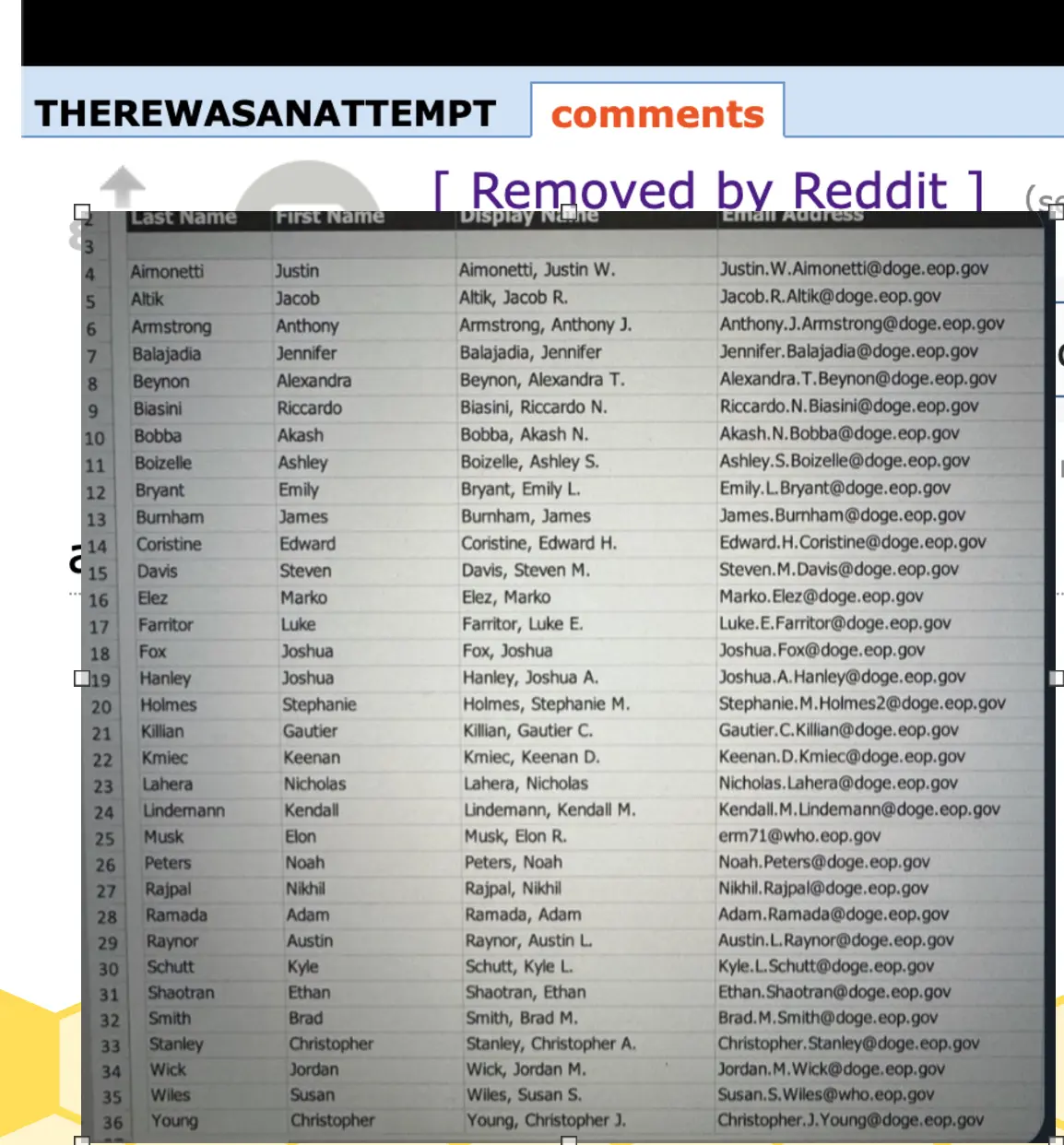
HEREWASANATTEMPT Last Name First Name Justin comments 10 Aimonetti Altik Armstrong Balajadia Beynon Biasini Bobba Boizelle 11 12 Bryant 13 Burmham 15 16 Jacob Anthony Jennifer Alexandra Riccardo Akash Ashley Emily James Edward Steven Marko Luke Joshua Coristine Davis Elez Farritor Fox Hanley Kmiec 17 18 19 20 Holmes 21 Killian 22 23 Lahera 24 25 26 27 28 29 30 31 Lindemann Musk Peters Rajpal Ramada Raynor Schutt Shaotran Joshua Stephanie Gautier Keenan Nicholas Kendall Elon Noah Nikhil Adam Austin Kyle Ethan 32 Smith 33 34 35 36 Stanley Wick Wiles Young Brad Christopher Jordan Susan Christopher Aimonetti, Justin W. Altik, Jacob R. Balajadia, Jennifer Beynon, Alexandra T. Biasini, Riccardo N. Removed by Reddit 1 Display N Armstrong, Anthony J. Bobba, Akash N. Boizelle, Ashley S. Bryant, Emily L. Burnham, James Coristine, Edward H. Davis, Steven Elez, Marko Farritor, Luke Fox, Joshua Hanley, Joshua A. Holmes, Stephanie Killian, Gautier C. Kmiec, Keenan D. Lahera, Nicholas Lindemann, Kendall M. Musk, Elon R. Peters, Noah Rajpal, Nikhil Ramada, Adam Raynor, Austin L. Schutt, Kyle L. Shaotran, Ethan Smith, Brad M. Stanley, Christopher A Wick, Jordan M. Wiles, Susan S. Young, Christopher Justin.W.Aimonetti@doge.eop.gov Jacob.R.Altik@doge.eop.gov Anthony.J.Armstrong@doge.eop.gov Jennifer. Balajadia@doge.eop.gov Alexandra.T.Beynon@doge.eop.gov Riccardo.N.Biasini@doge.eop.gov Akash.N.Bobba@doge.eop.gov Ashley.S.Boizelle@doge.eop.gov Emily.L.Bryant@doge.eop.gov James.Burnham@doge.eop.gov Edward.H.Coristine@doge.eop.gov Steven.M.Davis@doge.eop.gov Marko.Elez@doge.eop.gov Luke.E.Farritor@doge.eop.gov Joshua.Fox@doge.eop.gov Joshua.A.Hanley@doge.eop.gov Stephanie.M.Holmes2@doge.eop.gov Gautier.C.Killian@doge.eop.gov Keenan.D.Kmiec@doge.eop.gov Nicholas.Lahera@doge.eop.gov Kendall.M.Lindemann@doge.eop.gov erm71@who.eop.gov Noah.Peters@doge.eop.gov Nikhil. Rajpal@doge.eop.gov Adam.Ramada@doge.eop.gov Austin.L. Raynor@doge.eop.gov Kyle.L.Schutt@doge.eop.gov Ethan.Shaotran@doge.eop.gov Brad.M.Smith@doge.eop.gov Christopher. Stanley@doge.eop.gov Jordan.M.Wick@doge.eop.gov Susan.S.Wiles@who.eop.gov Christopher. J.Young@doge.eop.gov
It’s not perfect, but being able to do that on anything just by pressing one button is pretty nifty imo. Convenient.
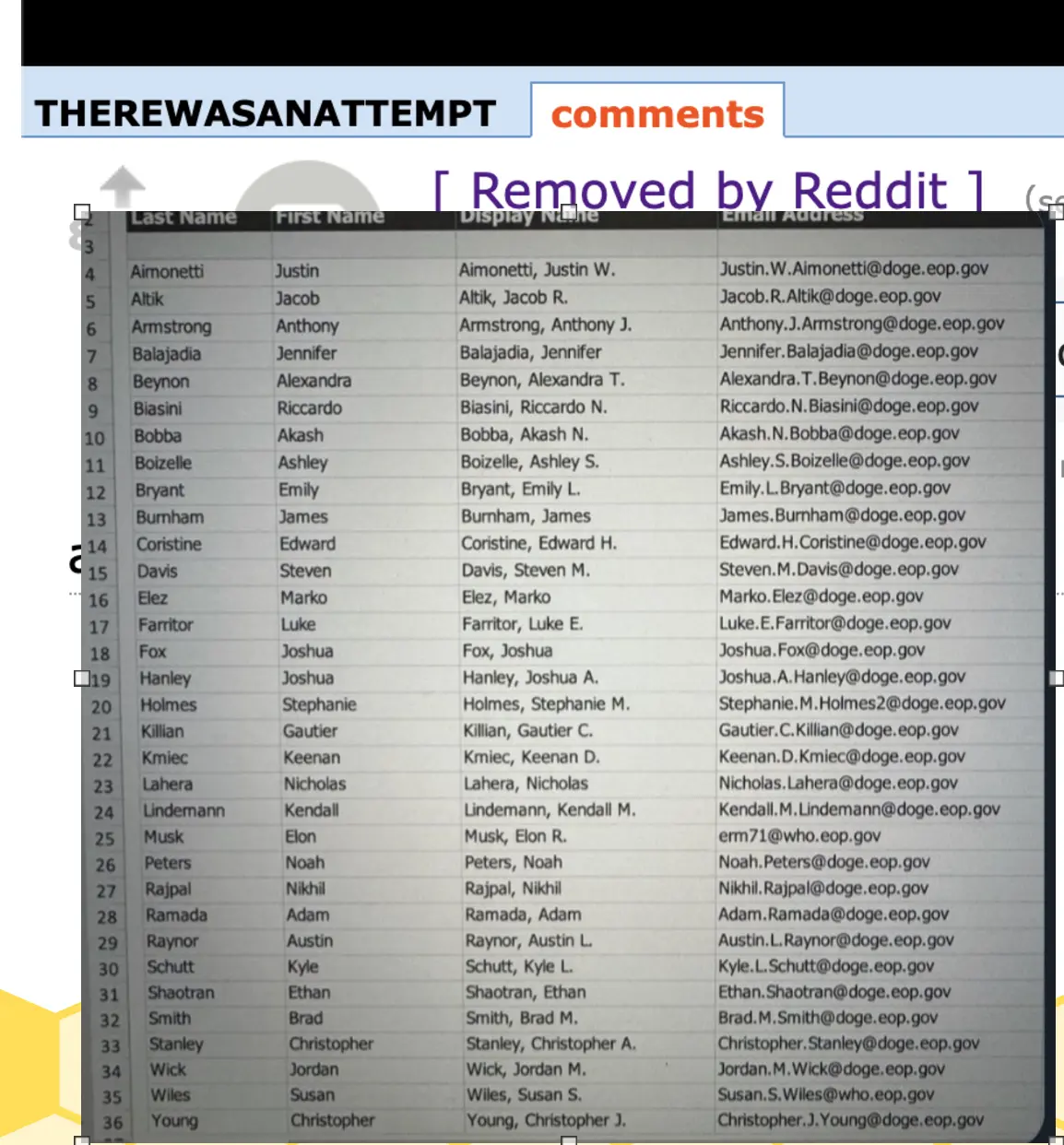
That looks pretty good, and yes that is an accurate finding about your phones feature. We can take this one step further though, if you can find a good webp to pdf converter like Sterling-pdf (self-host able but I don’t have a machine with me at work to do this rn), then you can convert the PDF to markdown and it will preserve the formatting. Then we can convert it to HTML and we’ve reverse engineered the page in the image and could even publish it onto the open web!
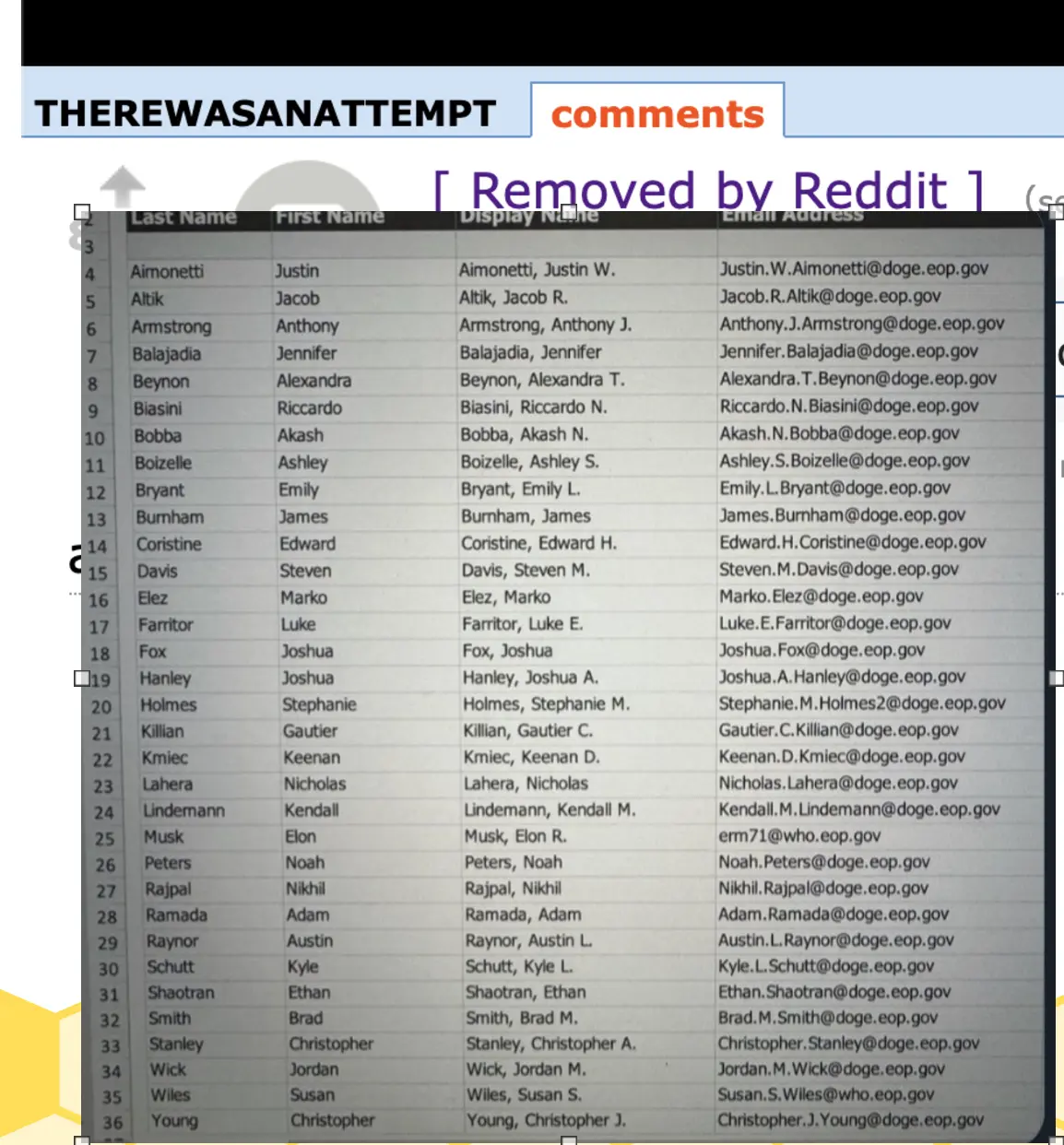
Edit: actually you can probably skip the markdown step now that I think about it lol

OCR is an automation tool designed to pull text out of images or PDFs. It’s super useful, you can scan documents and then use OCR to create a markdown/plaintext copy that’s easier to search for. I like doing this for documents where I need the wording more than the paper itself, like my lease
You’re not wrong that they might not realize the consequences. But the consequences are still real. I would much prefer that the consequences of their actions are things like cyber bullying and phishing instead of things like WW3 and yet another holocaust
Yeah, most of them look generated but it looks like that guy chose his email. I bet he uses that elsewhere, and I bet he’s dumb enough to be on some password list somewhere
Edit : https://haveibeenpwned.com/ erm71@gmail.com shows a few interesting pwns. I bet you could find those lists and run a few shots at that .gov email
Yeah why not. I sure hope they have OCR enabled

Capitalism as a whole is almost always incompatible with anarchy, at least in the way we tend to do it now.
That last part is really important. Many anarchists, socialists, and whatnot recognize that capitalism can be fine. It’s just that humans really suck at doing capitalism, we keep doing pseudo-feudalism instead
Honestly just memorize the fundamental ones and google everything else you need on the fly. You’ll naturally memorize the ones you use often.
I’ve used VIM for nearly 5 years and the only keybinds I have memorized are ‘a’ (append right here) ‘A’ (append to end of line) ‘i’ (insert right here) and I use the arrows to navigate instead of the letters. The only incantation I have memorized is %s/text to replace/text to replace with/g (find and replace through entire file. Remove the /g to find and replace only the next instance).
Once you have those, you can basically do anything that you’re capable of in a normal editor. If you need to do something beyond that, search “how to x in vim” and click the first stack overflow link that comes up, hasn’t failed me yet