- bloopernova@programming.devEnglish3 years
This is the best way. It’s also the way the Shellcheck
wantssometimes recommends.- 3 years
@bloopernova As you mention it, here the links for anyone interested: Online tool https://www.shellcheck.net/ and you can install it locally too https://github.com/koalaman/shellcheck .
- hascat@programming.devEnglish3 years
While this looks like a handy tool, it does make me think shell scripting itself needs a cleaner approach than what we have currently.
 3 years
This isn’t true. Shellcheck doesn’t insist on braces unless it thinks you need them.
- bloopernova@programming.devEnglish3 years
Oh! I didn’t know that (um, obviously lol)
I’ll edit my comment.
This has never stuck with me, and I hadn’t thought about why until now. I have two reasons why I will always write
${x}_$y.zinstead of${x}_${y}.z:- Syntax highlighting and shellcheck have always caught the cases I need to add braces to prevent
$x_being expanded as${x_}. - I write a lot of Zsh. In Zsh, braces are optional in way more cases.
"$#array[3]"actually prints the length of the third item inarray, rather than (Bash:) the number of positional parameters, then the string'array[3]'.
- 3 years
@gamma I just use them out of consistency and principle, so I don’t need to think in which case it is required or not.
- 3 years
I will always write
${x}_$y.zinstead of${x}_${y}.z:The difference between the two seems different to what’s in the OP. Is there a typo here?
in the OP
My reply is to a commenter who said they prefer
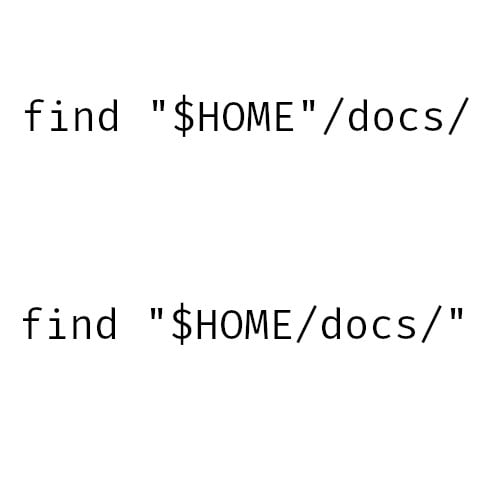
"${HOME}/docs"over both options in the original image ("$HOME/docs"or"$HOME"/docs). Many people prefer to always include braces around the parameter name out of consistency, instead of only when they are required.My comment explained why my habit is to only include braces when they are necessary.
- Syntax highlighting and shellcheck have always caught the cases I need to add braces to prevent
- 3 years
find “$(echo $HOME > variable_holder.txt && cat variable_holder.txt)/$(cat alphabet.txt | grep “d”) $(cat alphabet.txt | grep “o”)$(cat alphabet.txt | grep “c”)$(cat alphabet.txt | grep “s”)”
This is the easiest method
- 3 years
@ilega_dh You don’t need
catin cases whengrep "d" alphabet.txtcan read from file too. Edit: But obviously your comment was more of a joke to over complicate it. So never mind then. - 3 years
What should I search to better understand what is written here? Don’t mind learning myself, just looking for the correct keywords. Thanks!
- 3 years
Read the Bash manual. That one patter on the GP is called “Command Substitution”, you can search for it.
- 3 years
This comment is a joke and you wouldn’t want to do it like that in reality, but here are some related keywords you could look up: “Unix cat”, “Unix pipeline”, “grep”, “output redirection”, “command substitution”.
- key@lemmy.keychat.orgEnglish3 years
First one, then the other, then I forget the quotes, then I put them in single quotes by accident, then I utilize that “default value” colon syntax in case I’m missing HOME , then I just stick to ~ for the rest of the file.
Typically
find "$HOME/docs", but with a few caveats:-
In Zsh or Fish, the quotes are unnecessary:
find $HOME/docs -
If I’m using anything potentially destructive:
mv "${HOME:?}/bin" ... -
Of course, if it’s followed by a valid identifier character, I’ll add braces:
"${basename}_$num.txt"
-